Create a product with the AI Product Creator
Type an idea. The AI writes and designs the product, cover, mockups, description and FAQ, and saves it to My Products as a draft.
- Click AI Product Creator in the left menu.
- Click Create a product.
- Describe your idea in a few words and who it’s for.
- Approve the plan: pick a title and edit the outline.
- The AI builds it. This takes a few minutes.
- Open My Products. Your new product is waiting as a Draft. Check it, set a price and switch it to Live.
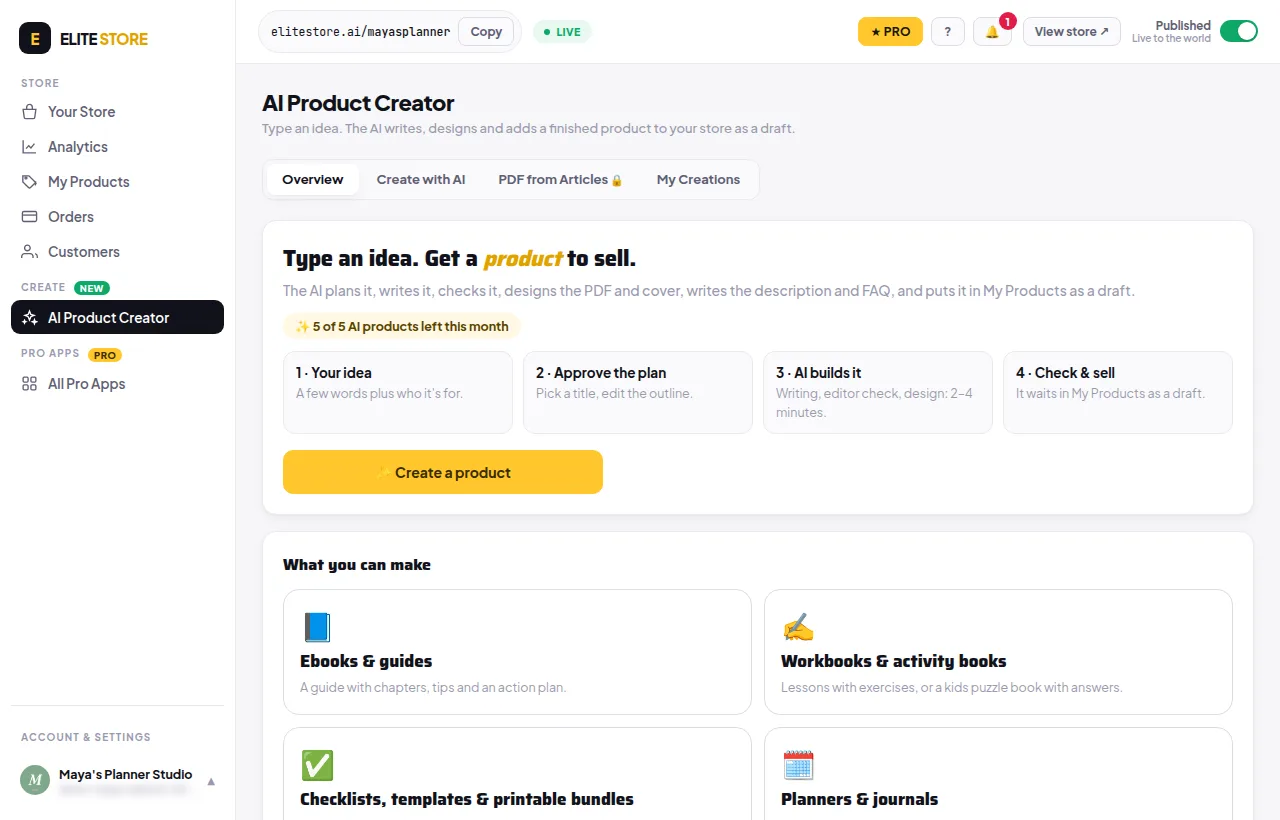
What it can make
- Ebooks and guides
- Workbooks and kids activity books
- Checklists
- Prompt packs (PDF + text + spreadsheet)
Planners and journals are shown as coming soon.
How many you can make
- Free plan: 1 free try.
- Elite Store Pro: 5 products included every calendar month.
- After that, each product uses 200 credits from your TEE account. If a build fails, you get the credits back, and failed builds don’t count towards your included products.
💡
Always read through an AI-made product before you sell it.
Was this helpful?Thanks for letting us know.
Questions? Email support@theeliteengines.com.