Copy or change your store link
Copy your elitestore.ai link, or change it. Your old link stops working straight away and you can change it once every 30 days.
The Your link box sits above the live preview on the Store and Design tabs of Your Store.
- Go to Your Store → Store.
- Click Copy to put your full link (https://elitestore.ai/yourname) on your clipboard. Or click Change to pick a new name.
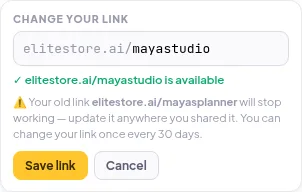
- Type the new name and wait for the green “is available” message.
- Read the warning, then click Save link.
⚠️
Your old link stops working as soon as you save. Update it in your bio and anywhere else you shared it.
After a change, the Change button is greyed out and shows how many days are left. You can change your link once every 30 days. Claiming your first name in the pop-up doesn’t start that clock.
Was this helpful?Thanks for letting us know.
Questions? Email support@theeliteengines.com.